
Basic Charging Process
Connect Power
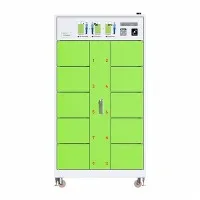
Plug the charging cabinet power cord into a 220V AC outlet, ensuring proper grounding. Some devices may support 380V industrial power; please select the appropriate outlet based on your device specifications.
Insert Batteries
Open the charging cabinet door and insert the batteries correctly into their corresponding slots (note the positive and negative terminals). If the device supports charging multiple batteries simultaneously, distribute them evenly to avoid localized overheating.
Start Charging
Manual Mode: Select the charging mode (e.g., constant current charging, constant voltage charging) via the device panel or touchscreen, and set the charging current (e.g., 2A, 5A) and cutoff voltage (e.g., 4.2V/cell).
Automatic Mode: Some intelligent charging cabinets can automatically identify battery parameters and match the optimal charging curve, eliminating the need for manual settings.
Monitor the Charging Process
Observe the display screen or indicator lights to confirm the charging status (e.g., "Charging," "Completed," "Fault").
Regularly check the battery temperature. If it exceeds 50℃, pause charging and investigate the cause (e.g., poor contact, battery aging).
Charging Complete
After charging is complete, the device may automatically power off or emit a notification sound.
Before removing the battery, turn off the charging cabinet power (some devices support hot-swapping, but it is recommended to operate with the power off).